Demersus Devlog #14 - Unity DX12 Stutter Fix, New Start Cutscene, Lore Inspect, Office Block out and more
Finally figuring out what was the cause of that weird Unity DX12 stutter, necessary change to the start cutscene idea, lore item inspect mechanic, rough office block out and a couple more smaller fixes and things.
- reading time
- 8 minutes
- published
- last updated
- authors
- Eryk Darnowski
- series
- Demersus Devlogs
- categories
- Game Development
- tags
- #Ztgk #Unity
Trigger warning - talk of a fictional character’s suicide attempt!
Fix for Unity’s DirectX 12 Stutter
Very long story short, I’ve been experiencing a particularly weird stuttering issue
with Unity 6.3 LTS (6000.3.8f1) in combination with DirectX 12 that I described in
more detail within
Demersus Devlog #10
. Sadly, recently
it has gotten so bad that even restarting the whole PC didn’t work anymore, this pushed me
to create
my first post on Unity’s forum
(I strongly suggest you read through it, if you’d like to get more info).
And although I still feel like this is a bit of a ‘patch’ instead of a real fix, the solutions (thanks to CodeSmile ) are either:
- Turning OFF G-Sync for the Unity editor (in my case as I use an Nvidia GPU I could do that on an app by app basis in the
NVIDIA Control Panel) - Switching to a different API (like Vulkan or DirectX 11) - this could be temporary or permanent (for example I was only experiencing this issue in-engine so you can just switch back to DX12 before building the game, however you can easily see how this is quite problematic and not ideal)
Because I didn’t see this as a proper fix, I also submitted this bug directly to Unity.
New Approach to Start Cutscene
After talking to him about our idea behind the game and more specifically the start cutscene, he let us now that we’ll have big issues and might get disqualified very early on if we:
- Don’t show the protagonist Clearly deciding against going through with the suicide
- Show him falling through the floor (at least close to the attempt) - as that could be interpreted as him falling “down to towards hell”
Besides informing us of those issues, he also gave us some great tips regarding what could be a better / cooler way to approach the cutscene.
Luckily these changes are not that major as they don’t really change the story or the meaning that was already planned. We did however have a bit of a bigger issues with the initial fall not being allowed as that was I guess an easy explanation for a lot of things, a simple segue for the plot. After some brainstorming however, I feel like we adapted to the changes pretty well.
Lore Inspect Mechanic
When using this prefab, after adding a lore object model, you have to remove it’s collider, and set it’s Rendering Layer Mask to Default and Lighting Layer 1 (however these are checked at runtime and do self heal)!
When using this prefab, you need to ensure that you set your model(s) in OBJECTS at positions Vector3(0) and just offset OBJECTS positiong (if using the optional Spline make sure the first point matche the offsets of OBJECTS)!
Because I planned to have things I affectionately call ’lore pickups’ (items you can take a closer look at that give you a small level of lore exposition / backstory) in the game, on picking the up was one of the mechanics I had to implement and this is how I did it!
I started out with a rough TODO list, then I went in to Unity and started prototyping. I started out by making the really cool player detection functionality I designed while working on the phone puzzle more agnostic and therefore detached from that specific puzzle, so it can be used across the board, for a bunch of different things in the game (that should’ve been done right away but oh well.).
After that I moved on to building a prefab for it, doing a lerp transition and basic rotate and zoom functionality. Then I moved on to adding a little light so even if it’s dark you can clearly see the text or details on the item - this caused a bit of trouble but in the end I managed to figure out how to separate the light’s effect and only light up the lore item - you have to first turn on the Light Layers in Project Settings and (this tripped me up) in your light’s settings, under General you have to click the little three dots in the top right and then Show All Advanced Properties, that’ll make the Rendering Layer Mask setting show up. Next I decided to implement an optional Spline you can use to for example move the object from under or above something and then do a lerp (so it doesn’t phase through the object).
After all that I still had to fix some bugs, the first was a mistake in the KeyPrompt material config which caused to to be occluded (this was an easy enough fix - just changing the Depth Test parameter of the material), the second was the left over walk and head bob velocity which caused the object to miss the screen’s center and then snap in to it (this was fixed by checking the camera’s position each frame and adjusting the destination point) and finally, the one I’ve struggle with the most.
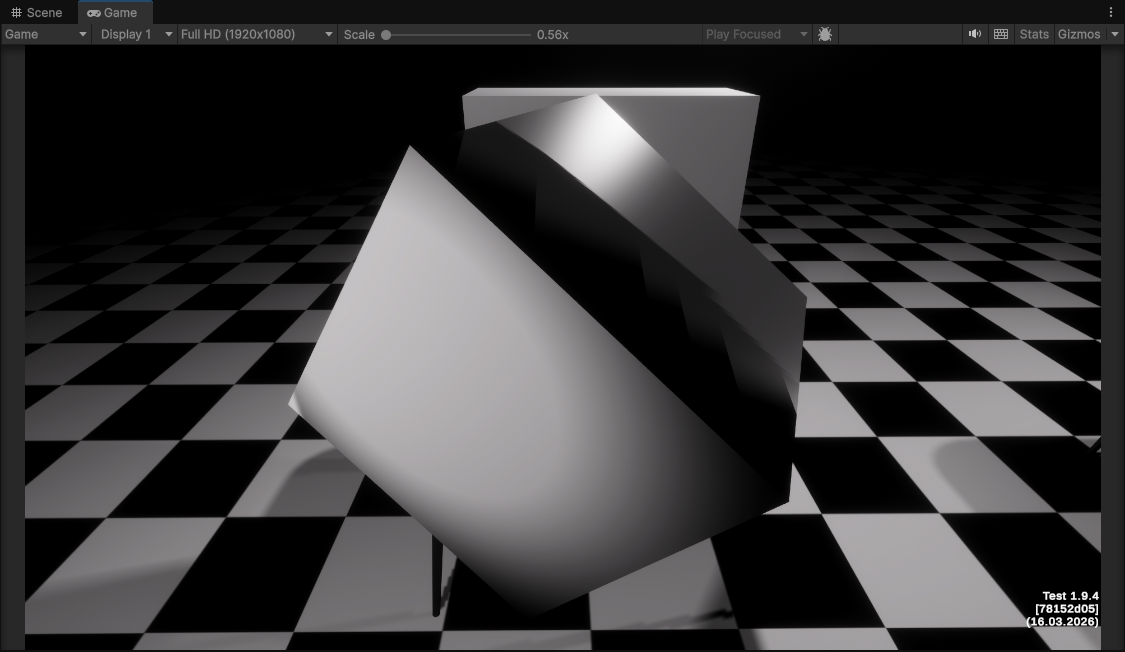
The final fix I had to do was what I called body blocking, what I mean by that is that if you zoomed the lore object in enough, it would end up in the temporary cylinder we used as a stand-in for the protag’s body. This was causing shadow artifacts as seen here:
I tried a variety of solutions, ranging from Light Layers, Shadow Layers,
Custom Pass Volumes and nothing really worked, this was a hard issue because I wanted
to have my caked and eat it too I wanted for environment lights to influence the object
and also didn’t want to turn off the protag’s mesh renderer (for obvious reasons).
Finally after a bunch of time banging my head against the wall, a close friend of mine
suggested simply squishing the protag’s mesh on the Y axis which would both not really be
visible (at least in the majority of situations) and at the same time checked all of the
boxes I needed it to check! However, before doing that I quickly put in a more realistic
temporary mesh (a low poly human - important thing to note here was setting Cast Shadows
to Shadows Only for it to not be causing issues with the FPP camera) which solved the issues,
however I did add the squish as a fallback (just in case). Here is how all of that turned out:
Rough Office Block Out
If you’re using ProBuilder make sure you have proper geometry as otherwise the mesh collider will have issues and you may get unexpected behavior like randomly falling through the floor!
Because the start cutscene has been a hot topic recently, after brainstorming how to implement the newly introduced changes we decided it would be a good idea to create a rough block out of the new office area, so my bud did just that:
Automatic Version Display UI
Something that’s been bugging me throughout the development cycle of Radiorum and now also Demersus is (to put it plainly) the sloppy approach to the version display / versioning (the little thingy you see in the bottom right corner).
If you look back through the previous devlogs (most specifically the media withing them), you might sometimes notices discrepancies with the version numbers / dates and such. This might seem minor, but really isn’t as it could cause issues with discrepancies and our ability to track down an issues especially when the game is being tested by a larger crowd.
Therefore, recently I decided to automate this by implementing a prefab (that could be used
across scenes) and a script that automatically grabs the prefix + version of the game
from the Project Settings, the latest git commit's hash and the current date. These
get automatically updated when in engine but when the game is built, they get cached in a
simple .txt file that gets packaged alongside the other game files using
Streaming Assets
(it also gives access to a simple override for each field if the situation calls for it)!
Camera Clipping Fix
Something I’ve noticed while watching my bud move through the latest test build of the game was that he’d hug the walls and objects a lot resulting in camera clipping:
This turned out be caused by the default value of the camera’s frustum near clipping plane. After setting that to a low enough value the issues dissapeard. I read that if the value is too low however it can cause z-fighting issues, so we’ll have to keep an eye on that in the future (for now it looks like it’s not causing any issues):
What’s Next?
I’ve already been prepping to do a deep dive in to our approach to motion capture and
animations / cutscenes in general, therefore I’d like to finally test these ideas out
and create a pipeline (the very next day after writing this post, my right Index
controller decided to kill itself causing a change of plans), the same way I did with
the
Clay Doh model creation and import / export
.
However, I feel like to be able to do that without as much waste, it would be good to finish
up at least the Office area as I’m planning to start out with that cutscene first.
Besides that, again, I have to finally take care of the wife and daughter sequence programming. The next two weeks, we won’t have Uni, so I’m hopeful we’ll manage to do a bunch of progress.
In other news, I got a better drawing tablet which should come in handy!